

TBC – Automator Custom Field Triggers
Add FluentCommunity custom profile field triggers to Uncanny Automator. Fire any automation when a member updates a specific field to a specific value.
Fire any Uncanny Automator recipe when a member updates a Fluent Community custom profile field — match a specific value, watch any change, or react to any field at all.
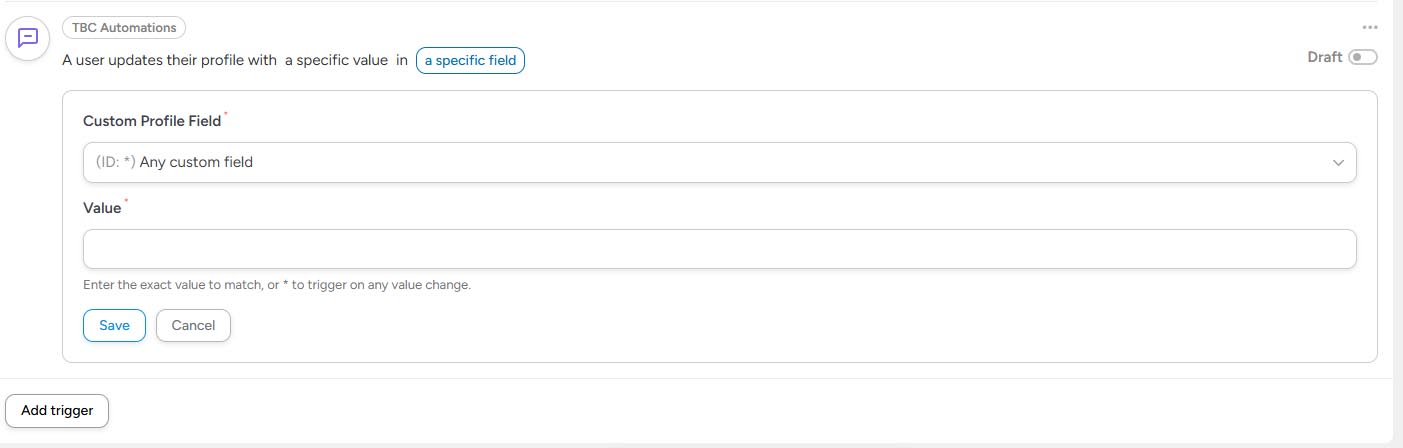
This add-on registers a new trigger under the TBC Automations integration: “A user updates their profile with a specific value in a specific field.” Use it to send DMs when someone fills out their bio, change roles when a member picks a plan in a dropdown, tag users by location, kick off email sequences when a milestone field changes — anything Automator can do, you can now wire to FC profile field updates.
Both the field and the value support a * wildcard, so you can match exactly, match anything, or match anywhere — whatever your recipe needs.
What It Does
- Fires on real field changes — only triggers when the value actually differs from before; saving the profile without changing anything won’t fire
- Specific field, specific value — pick a custom field from a dropdown, type the exact value to match
- Specific field, any value — set value to
*to fire on any change to that field - Any field — set field to the wildcard option to fire on changes to any custom profile field
- Any field, any value — both wildcards = fires on every profile change. Useful for activity logging.
- Multiselect-aware — for fields with multiple values, the trigger matches if all expected values are present in the new selection
Tokens Available to Your Recipe
TBC_PROFILE_FIELD— readable label of the field that changed (e.g. “Favorite Genre”)TBC_PROFILE_FIELD_SLUG— machine slug of the field (e.g.favorite_genre)TBC_FIELD_VALUE— the new value that was just savedTBC_FIELD_OLD_VALUE— the previous value before this change- Standard user tokens — first name, last name, email, username, user ID, all populated automatically
Common Use Cases
- Auto-assign roles based on a dropdown — when “Membership Tier” changes to “Premium”, grant a WordPress role
- Welcome flows tied to specific fields — when “Bio” gets filled in for the first time, send a DM saying “Great profile! Here’s what to do next.”
- Tag users by location — when “City” changes, add them to a Fluent CRM tag for that region
- Track field changes — log every profile update to an external tool (Slack, Discord, Google Sheets) via Automator’s other integrations
- Conditional space access — when a custom field hits a milestone value, auto-add the user to a private space
How It Works Under the Hood
- Hooks Fluent Community’s
fluent_community/update_profile_datafilter at priority 999 — runs after FC Pro’s CustomProfileFieldsHandler so the merged field data is final - Diffs old vs. new custom field values, normalizes arrays vs. strings, identifies what actually changed
- Fires
tbc_fcom/profile_custom_fields_updatedas a custom action that Automator’s trigger system listens to - Trigger evaluation handles wildcards, exact matches, multiselect comparison, and case-sensitive scalar matching
Clean & Safe
- Doesn’t modify FC’s profile data — purely reads the diff from the existing filter
- No extra tables, no custom options pages, no admin UI of its own
- Only fires when fields actually change — saving the profile with no edits is a no-op
Requirements
- WordPress 6.0+
- PHP 7.4+
- Uncanny Automator (free or Pro)
- Fluent Community (Pro recommended — custom profile fields are a Pro feature)
Installation
- Install and activate Uncanny Automator and Fluent Community.
- Upload
tbc-automator-fcom-fields.zipvia Plugins → Add New → Upload. - Activate. The new trigger appears under the TBC Automations integration in Automator’s recipe builder.
License
100% free. GPL v2 or later. No license key, no activation, no upsell — just install and use.