

TBC – Automator Send FluentChat Direct Message
Add a "Send FluentChat Direct Message" action to Uncanny Automator. Fire DMs from any user to any user when an automation runs.
Send FluentChat direct messages from any Uncanny Automator recipe — perfect for welcome flows, onboarding sequences, or any moment where you want to reach out personally in response to a trigger.
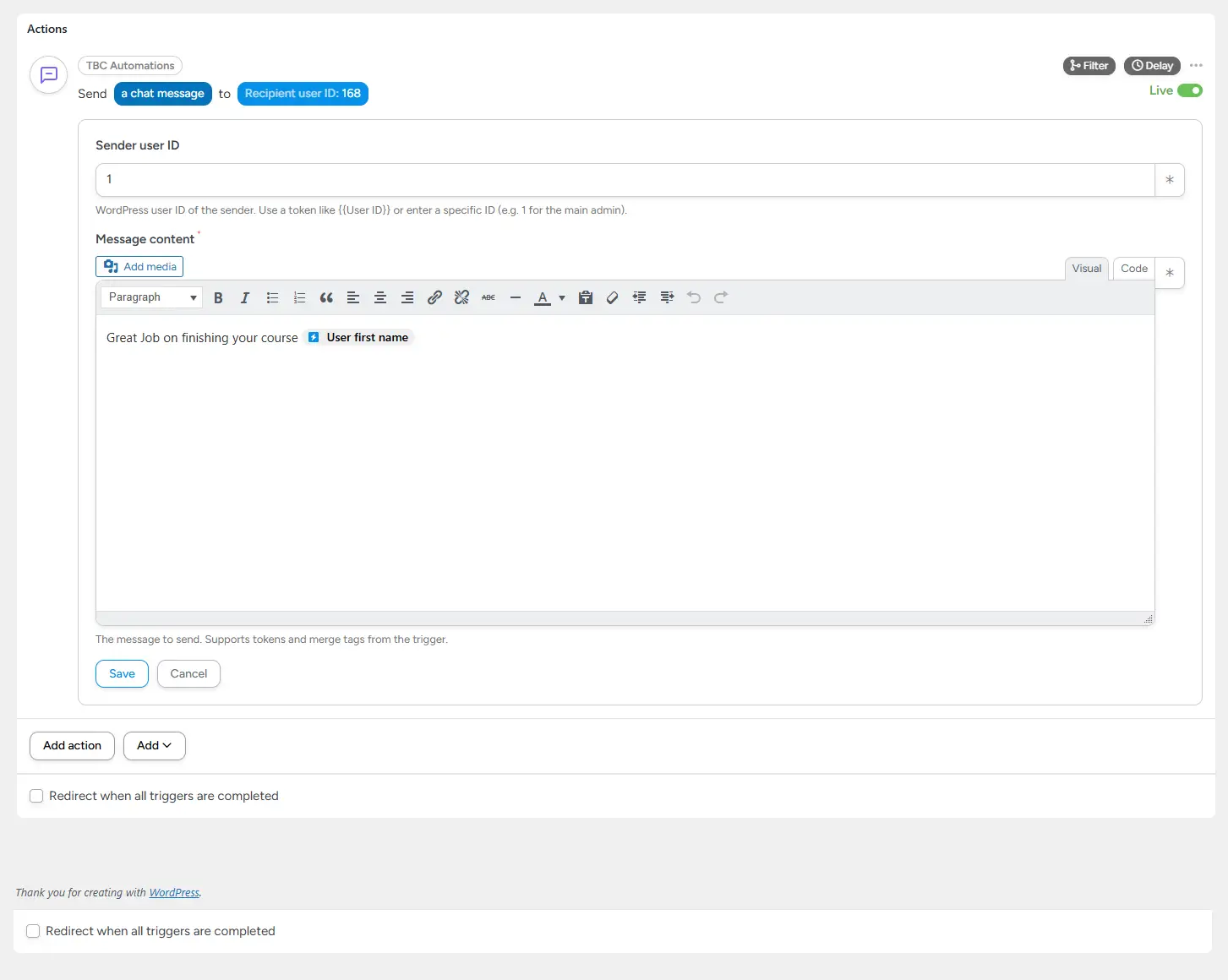
This add-on registers a new Send Direct Message action under the TBC Automations integration in Uncanny Automator. Pick a sender, pick a recipient, write the message — and any Automator trigger can now drop a real DM into the recipient’s FluentChat inbox.
It’s a real DM, not a notification. It appears in the recipient’s chat thread with the sender, gets unread counts, supports follow-up replies, and behaves exactly like any other FluentChat conversation.
What It Does
- Sends a real FluentChat DM — full chat thread between sender and recipient, just like a manual message
- Sender user ID — any WordPress user ID (use a token from the trigger, or hardcode
1for an admin-sent welcome message) - Recipient user ID — token-friendly, typically
{{User ID}}from the trigger - Rich message content — TinyMCE editor, tokens, merge tags, and shortcodes all supported
- Validation built in — refuses to send if sender = recipient, if either user doesn’t exist, or if the message is empty. Errors are reported directly in Automator’s recipe log.
Common Use Cases
- Welcome DM after signup — trigger on user registration, send a personal hello from the community owner
- Course completion congratulations — trigger on lesson complete, DM the student a “well done” message
- Onboarding sequences — chain multiple DMs over days or weeks via Automator’s delay actions
- Order follow-ups — trigger on Woo purchase, DM the buyer a thank-you and next-steps message
- Re-engagement campaigns — trigger on inactivity, send a personal nudge from a real human admin
How It Works Under the Hood
- Registers a new action with code
TBC_SEND_DMunder theTBCAUTOMATIONSintegration - At runtime, parses tokens for sender/recipient/message, validates everything, then calls FluentChat’s native DM helpers to insert the message into the proper thread
- Same code path FluentChat uses internally — no forked schema, no custom message store
Clean & Safe
- Doesn’t modify FluentChat’s database — uses the native message-send path
- No extra tables, no custom options pages
- Strict validation prevents bogus DMs (self-messages, missing users, empty content) — failed runs are logged with a clear reason
Requirements
- WordPress 6.0+
- PHP 7.4+
- Uncanny Automator (free or Pro)
- FluentChat
Installation
- Install and activate Uncanny Automator and FluentChat.
- Upload
tbc-automator-fluentchat.zipvia Plugins → Add New → Upload. - Activate. The new action appears under the TBC Automations integration in Automator’s recipe builder.
License
100% free. GPL v2 or later. No license key, no activation, no upsell — just install and use.