

TBC – Automator Send Notification
Add a "Send FluentCommunity Notification" action to Uncanny Automator. Trigger native in-app notifications from any recipe — with smart click-through to spaces, posts, profiles, or courses.
Trigger native FluentCommunity in-app notifications from any Uncanny Automator recipe — with one-click routing to spaces, posts, profiles, or courses.
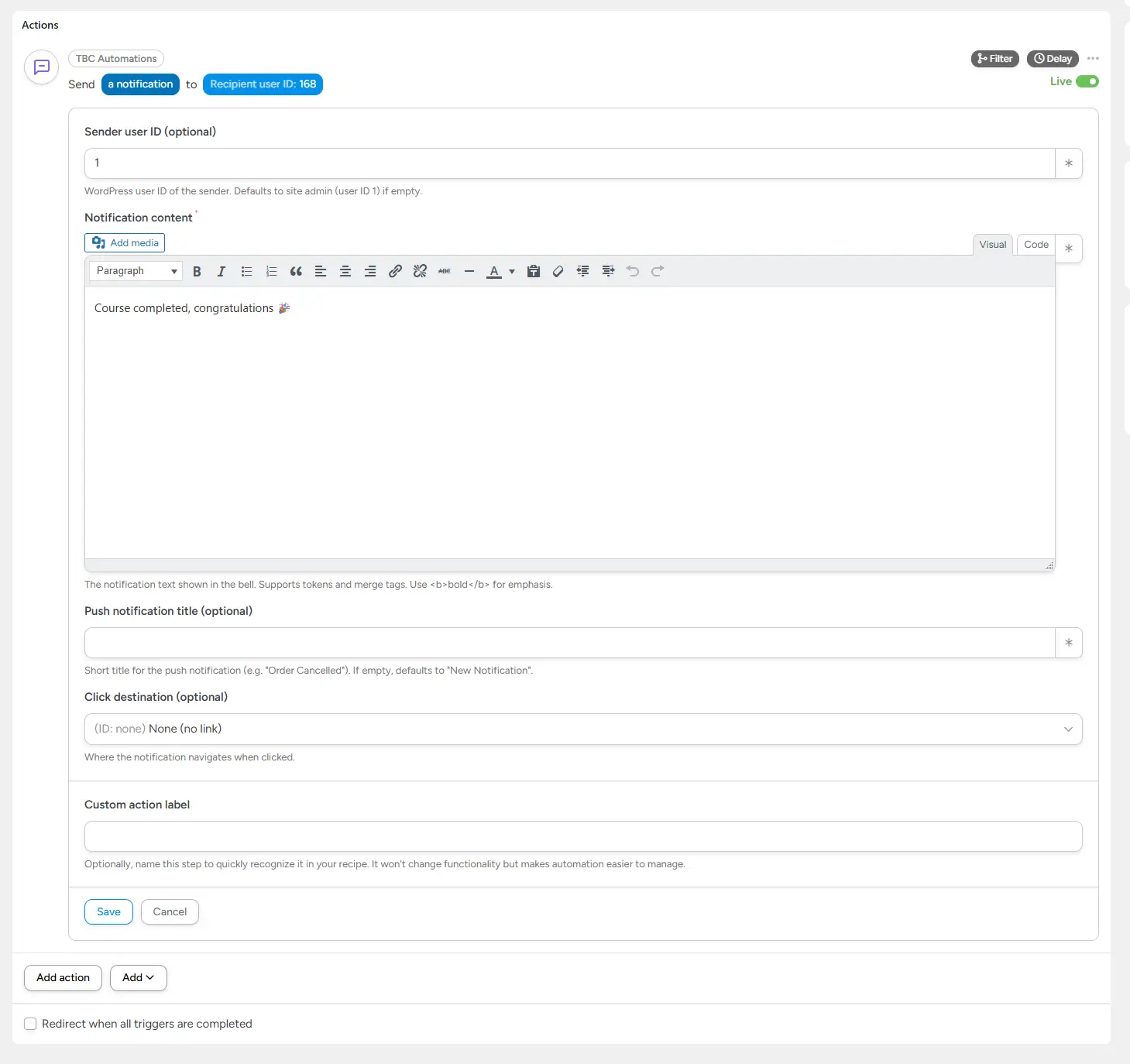
This add-on registers a new Send Notification action under the TBC Automations integration in Uncanny Automator. Pick a recipient, write the notification content, choose where it should navigate when clicked — and any Automator trigger can now fire a native FC bell-icon notification (and accompanying push notification, if you have the TBC Community App).
No code, no custom integrations, no shortcodes. The action is fully token-aware so you can pull recipient IDs, space IDs, post IDs, and course IDs straight from the trigger.
What It Does
- Sends a real FC notification — uses Fluent Community’s native notification table, so it shows up in the bell, in unread counts, and in any push pipeline you have wired up
- Recipient by user ID — direct field or token from the trigger (e.g.
{{User ID}}) - Rich content — TinyMCE editor with token support, shortcode support, and basic HTML formatting
- Optional push title — separate “Push notification title” field for the OS-level alert (defaults to “New Notification” if empty)
- Optional sender override — choose any user ID to appear as the notification’s sender avatar/name. Defaults to user ID 1 (site admin).
Click Destinations (Routing)
Pick one from a dropdown — only the fields relevant to your choice appear:
- None — notification with no link
- Space home — opens a specific space’s feed (Space ID or slug)
- Post in a space — opens a specific post inside a space (Space + Post)
- Community post — opens a single post not tied to a space
- User profile — opens any member’s profile by username
- Course home — opens a course’s main page
- Course lesson — opens a specific lesson inside a course (Course + Lesson)
Smart ID Resolution
- IDs auto-convert to slugs — paste a numeric Space ID, Post ID, or Course ID and the action looks up the slug for you. No need to hand-type slugs or remember the difference.
- Slugs work too — type
book-clubdirectly if you prefer - Tokens fully supported — drop
{{Space ID}},{{Post ID}}, or{{Course ID}}from the trigger and it just works
How It Works Under the Hood
- Registers a new action with code
TBC_SEND_NOTIFICATIONunder theTBCAUTOMATIONSintegration - At runtime, parses tokens, resolves IDs to slugs via FC model lookups (
Space::find(),Feed::find()), and builds a proper FC route array - Inserts the notification through Fluent Community’s native helpers — same path FC uses internally
- Validates recipient exists before any work happens; fails the action gracefully with a useful error message if anything is off
Clean & Safe
- Doesn’t modify FC’s notification schema — uses the official insert path
- No extra database tables, no custom options pages
- Failed action runs are reported in Automator’s recipe log with the actual error (recipient missing, content empty, slug not found, etc.)
Requirements
- WordPress 6.0+
- PHP 7.4+
- Uncanny Automator (free or Pro)
- Fluent Community (free or Pro)
Installation
- Install and activate Uncanny Automator and Fluent Community.
- Upload
tbc-automator-fluent-notification.zipvia Plugins → Add New → Upload. - Activate. The new action appears under the TBC Automations integration in Automator’s recipe builder.
License
100% free. GPL v2 or later. No license key, no activation, no upsell — just install and use.