

Feedback & Suggestions for the FluentCommunity Native Android App
First of all, congratulations on what you've built!
I've been following the development of your FluentCommunity Native Android App closely, and I have to say that you've done an amazing job. It's exciting to see a dedicated native app for FluentCommunity, and I can already see many people talking about it and becoming interested.
Before adding many new features, I personally believe it would be worth polishing the core user experience. A more refined app will make a much stronger impression on the entire FluentCommunity community (12,000+ users) and encourage more people to choose your app over other alternatives.
What I Really Like
1. Notification System
The notification system and notification management are excellent. The design is clean, intuitive, and everything works really well.
2. Search Experience
The search interface is one of my favorite parts of the app. It's simple, modern, and very user-friendly.
3. Quick Profile Switcher
The quick profile toggle is fantastic. Having all the important menus easily accessible from one place makes navigation much smoother.
4. Settings Page
The Settings page is beautifully designed. It feels organized and professional.
5. Messaging / Chat
The messaging feature also looks great and feels much more natural than I expected.
6. Cache Management
The cache management system is another great addition. It's practical and gives users more control.
7. Admin Panel
Although I haven't used it personally yet, from your videos and screenshots, the admin panel and site management features look very well designed.
Suggestions for Improvement
These are just my personal opinions as someone who is genuinely interested in using this app.
1. Improve the Feed Layout
The current feed looks too much like the desktop version with boxed cards.
For mobile, I think a full-width feed similar to Facebook or X (formerly Twitter) would provide a much more natural mobile experience.
2. Redesign the Create Post Button
The current "Create Post" button feels a little distracting.
A floating circular action button in the bottom-right corner (similar to X) would be much cleaner.
Alternatively, placing the post composer at the top of the feed (like FluentCommunity on the web) would also work well.
3. Polish the Post Composer
The post creation box could use a bit more refinement. Right now it feels slightly awkward, but I believe with a little UI polishing it could become one of the best parts of the app.
4. Replace "Sort By" with "For You" & "Following"
Instead of showing:
- Latest
- Popular
- Oldest
I think it would be much more engaging to have:
- For You
- Following
Just like X.
- For You could display the Activity feed.
- Following could display posts from followed users.
This would encourage users to follow each other and make the community feel much more social.
5. Google Sign-In
Google Sign-In should be included. I believe this is almost essential for a modern community app.
6. Native Comment Styling
The Heading (H1, H2, etc.) formatting inside comments doesn't feel right.
Comments should look like native social media comments with simple, clean text formatting.
7. Support Custom CSS & JavaScript
Many FluentCommunity sites use Custom CSS and JavaScript for branding and extra functionality.
It would be great if the app could respect those customizations wherever possible.
8. Improve the User Profile
The profile cover image and overall profile UI could be more polished and user-friendly.
Profiles are one of the most visited parts of any community app, so making them feel premium would be a huge improvement.
9. Add the Leaderboard
FluentCommunity already has a great Leaderboard feature.
It would be wonderful to have it available inside the app as well.
Final Thoughts
Personally, I think focusing on these improvements before introducing many new features would make the app significantly stronger.
A polished user experience is what will convince the 12,000+ FluentCommunity users to choose your app over other solutions.
I've been following your progress regularly, and I'm genuinely excited about this project. I definitely want to purchase the app once it's ready.
One small request: please keep the pricing as affordable as possible. I believe a more accessible price will encourage many more FluentCommunity users to adopt it.
Once again, congratulations on building something the FluentCommunity ecosystem has been waiting for. You've done an outstanding job, and I'm looking forward to seeing how the app evolves in the coming months.

Arif — first off, thank you. Genuinely. Feedback this detailed, from someone who's actually been following along and testing things, is worth its weight in gold. Most people don't take the time. You did, and a bunch of these are going straight onto our list.
One thing that'll come up a lot below, so I'll say it up front: our north star is parity with FluentCommunity on the web. Most of our users specifically want the app to feel like their site, not a separate product — so when FC does something a certain way, we tend to mirror it. Where we can make something optional without breaking that for the parity crowd, we're always happy to look. And if you ever want to go completely off-script, that's exactly what the dev bundle (full source) is for — more on that at the end.
1. Feed layout. We actually ship three feed views today — Card, List, and Timeline — modeled on the FC mobile web experience, which is what most of our users ask us to match. That said, a full-width feed as an option is very reasonable: the folks who want web-style cards keep them, and people who want the X/Facebook feel can switch. If you've got a screenshot or specific example of the layout you're picturing, drop it in — helps us build the right thing instead of guessing.
2. Create Post button. Funny enough, we originally had the composer at the top of the feed just like FC web, and moved to the floating action button after people asked for it. So you're both right — which tells me the real answer is to make it a choice. We'll look at offering both.
3. Post composer polish. Happy to — but I need a little more to go on. Right now it matches FC's own mobile web composer pretty closely, so "awkward" could mean a few things. If you can point at what specifically feels off (spacing? the flow? a particular field?), ideally with a screenshot, we'll dig in.
4. Sort by → For You / Following. The sort options aren't ours — they come straight from FluentCommunity and its API. We support the full set FC offers: New Activity, Latest, Oldest, Popular, Likes, Alphabetical, Unanswered, and Following. A "For You / Following" tab layout like X is really a FluentCommunity UI decision — if FC built it that way on the web, we'd mirror it in the app with full parity. So that one's honestly best raised with the Fluent team directly. (And with the source code, you can build the feed however you dream it up.)
5. Google Sign-In. On our radar. Our approach with anything in the Fluent family — FluentAuth, Fluent Messaging, Fluent Cart — is to build core support for it, and we've already started on FluentAuth. So a social login option is something we'd love to bring as a core module. The module system is also open, so the community and other devs can build their own social login modules too — exactly what it's designed for.
6. Bare-bones comments. Totally get the instinct — clean, simple comments do feel more natural for a social feed, and I don't disagree. Here's the honest tradeoff, though: the formatting in comments isn't something we bolted on for its own sake. FluentCommunity on the web already lets members format their comments — bold, italic, and the rest — natively. We layered headings on top of that in the app, but the basic formatting is baked into FC itself. So even if we stripped the app's comments down to plain text, a member could still post a formatted comment from the web and it'd show up that way in the app — because that part's out of our hands. We can look into letting the admin hide the feature in the app from your users, but again they'd still have some formatting options on web unless you hide it there as well.
7. Custom CSS & JS. Great one to unpack, because it gets at what the app actually is. Ours is a fully native React Native app — real native screens, not a webview or a wrapper around your site. CSS and custom JS are web technologies; there's no webpage under the hood for them to style. What we do respect is FluentCommunity's native theming — set your accent color, logo, and site name in Fluent, and the app picks all of it up automatically, light and dark.
If what you're really after is "my site's exact CSS/JS carried into an app," that's closer to a PWA — a wrapper around your website. Different product category, and the tradeoff is you lose the speed and feel of a true native app. We went native on purpose, because that's the experience most communities are missing.
And this is where our two products matter: on the managed app we keep it clean, fast, and native, so it won't pick up site CSS by design. But the dev bundle ships you the entire source code. You could restyle it top to bottom, wire in anything you want — turn it into a talking-dinosaur UI if that's your thing. It's yours. So "respect my customizations wherever possible" is basically unlimited on the dev side — it's just done in native React, not CSS.
8. User profile. I'd love more detail here. We keep profiles in native parity with the FC website so they feel consistent, and I don't want to drift too far from that core — but "more premium" can mean a lot of things. What would make a profile feel premium to you? Specific elements, a layout you've seen elsewhere, the cover-image behavior? The more concrete, the better, and we can look at offering layout options.
9. Leaderboard. Totally with you. We'd love to add the core FC leaderboard and it's on the list. In the meantime — most of our own users run their leaderboard through GamiPress, so we already ship a full GamiPress leaderboard integration. But we hear you on native FC leaderboard support for folks on FC's built-in one, and we'll work on it.
On pricing — I want to spend a minute here, because I think our model is genuinely different from anything else in this space, and it's easy to read it through the lens of how everyone else prices these things.
First, a clarification: we're not trying to sell to all 12,000 FC users — that's kind of the point. We have two very different products for two very different people.
The managed app ($33/mo) is for someone who wants a clean, fast, native app for their community and doesn't want to deal with builds, store submissions, or updates — we handle all of that, on your accounts. It's for a smaller set of sites we work closely with. And even here: everything is built on your store credentials, under your name. Stop paying and you don't lose the app — it stays live on your accounts, you just stop getting updates. Compare that to BuddyBoss or Appzap, where you're paying hundreds a month and the app disappears the day you stop.
The dev bundle ($449, full source, one-time) is really for people managing their own clients, or anyone who wants total control. One license per client, you own it outright, and you charge your clients whatever you want.
And on $449 being "as affordable as possible" — I'll gently push back, because I think it's already doing something nobody else does. That's the entire source code to a production native app. No one in this ecosystem hands that over — it would blow up their own business model. BuddyBoss, Appzap, the rest: at best you get a few hooks to tweak things around the edges, usually at a premium, and never the actual source. We give you all of it. That's not us pricing high — it's us handing you the keys to the whole car for what others charge for a look under the hood.
So I'd flip the framing: the reason we can keep it this accessible is because we're not trying to be a 12,000-seat SaaS. We built these tools so communities never have to be locked into those monthly models again — full ownership, your accounts, your code. That freedom is the product.
Anyway — this is exactly the kind of feedback that makes the app better, so thank you again for taking the time. Keep it coming, especially screenshots on the layout and profile stuff. And when you're ready to grab it, we'll be here.
Hey Arif — quick follow-up on this, because a few of the things we talked through have actually shipped since.
Feed layout — you can now choose full-width (edge-to-edge, the X/Facebook feel) alongside the boxed card view. Admin sets the default, members can switch it on their own phone — exactly the "keep parity for the folks who want it, optional for everyone else" approach we discussed.
Create-post button — we did make it a choice, like we said we would. You can now pick a compact round + button, an inline composer pinned to the top of the feed (FC-web style), or the full-width bar. Both of the options you and others asked for, side by side.
Leaderboard — Fluent Community's native leaderboard is now in the app too: a real screen plus a home widget, with each member's own points, level and rank. (So that's the FC one now, in addition to the GamiPress integration we already had.)
They're all in the latest app version, 1.4.0 — update from the Play Store and you'll see them. Still chewing on the rest of your list; this was just the first wave. Thanks again for the nudge on these.

James William Elrod First of all, I want to say thank you for the incredibly fast updates. I honestly didn't expect to see so many improvements implemented so quickly. That really says a lot about how seriously you listen to your users, and I genuinely appreciate it.
Also, I've been following the app's progress consistently—honestly, almost every day. 😄 It's exciting to watch it evolve, and every update makes me even more interested in using it for my own community.
Now that I've had a chance to look through version 1.4.0, here are a few more thoughts.
1. Feed Layout
The new full-width layout is a huge improvement. It feels much more natural on mobile than before.
One small suggestion: in Full-width mode, I think each post should be separated a little more clearly. Right now there's a bottom bar, but it's still a bit difficult to visually distinguish where one post ends and the next begins. Also, the footer bar color feels slightly too prominent.
Maybe adding a subtle 2–3px divider or spacing between posts would make the feed much easier to scan while keeping the clean design.
2. Create Post Button
I absolutely love the new Create Post options.
If I had one tiny request, I'd personally use a simple "+" icon for the floating button if that's something you could make optional. It's a very familiar, clean, and standard icon that most users instantly recognize.
3. Leaderboard
I'm really happy to see the native FluentCommunity leaderboard added. That was one of the features I was most excited about.
The only thing that feels missing is the filtering that's available on the web version (7 Days, 30 Days, and All Time). Hopefully that's something you plan to add as well, because it makes the leaderboard much easier to understand and more engaging.
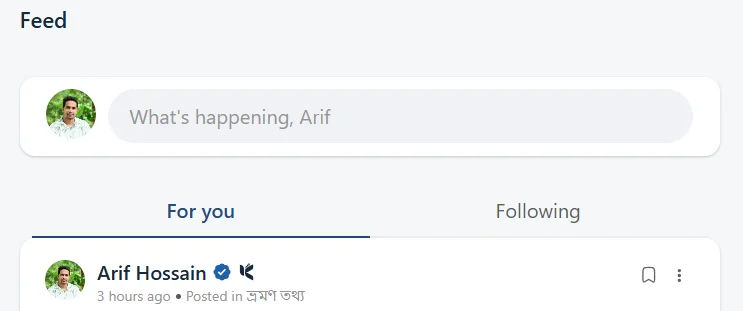
4. "For You" & "Following" Feed
I still think this idea would be worth considering (I included a screenshot in my original post).
Instead of showing:
• Latest
• Popular
• Oldest
I think having:
• For You
• Following
similar to X would create a much more social experience.
- For You could display the Activity feed.
- Following could display posts from followed members.
This naturally encourages people to follow each other and spend more time inside the community.
Since your app already provides multiple layout options, this could simply be another optional setting instead of replacing the current behavior.
Personally, I use the Timeline View as my default feed layout and keep Disable Layout Style Change Option enabled because, for my community, members rarely need to switch layouts.
5. Google Sign-In
I'm really looking forward to Google Sign-In.
For my own community—and I believe many others—well over 90% of users prefer signing in with Google. It removes the need to remember usernames, email addresses, or passwords, making onboarding much smoother.
6. Native Comment Styling
I'd still encourage you to consider removing Heading (H1, H2, etc.) formatting from comments.
Simple, native-looking comments usually feel much more natural in a mobile social app.
7. User Profile
I hope you'll consider making the profile page a bit more minimalist.
At the moment, the cover image and profile picture feel quite large, which pushes the important information further down the screen.
Personally, I'd love to see something closer to the profile layouts we're all familiar with on X, Facebook, or even FluentCommunity itself.
For example:
- A slightly smaller cover image.
- The profile picture aligned more to the left.
- The user's name, follow button, and key actions positioned beside it instead of lower on the page.
That said, you've already added some really nice elements to the profile. I think it just needs a bit of refinement to make it feel even more premium.
Finally, I just want to say that you're doing an incredible job.
I've also looked at the LazyCoders app, and in my personal opinion, your app is already 50–60% ahead in terms of features, usability, and overall design.
And if anything I've said comes across too critically, please don't take it the wrong way. My intention is only to help make an already great product even better. I genuinely enjoy following the progress of this project, and I'm eagerly waiting for the day I can use it in my own FluentCommunity.
Keep up the amazing work!