App update — Core 1.3.11: sell memberships in the app, unlisted posts, and a theme preview that shows its work
The headline is a big one: you can sell memberships inside the app now. Alongside it, a release with a lot of polish in it.
Sell memberships through Apple and Google
Members can buy a membership without leaving the app, and what they bought lives on your site, not in the store — the entitlement survives a reinstall, a new device, and the same person signing in on the web.
- You decide what each product unlocks: a role, particular spaces or courses, or everything.
- Renewals, cancellations, refunds and failed billing arrive from the stores on their own, with nobody opening the app.
- The app never sees a card, a price or an address — Apple and Google run the payment.
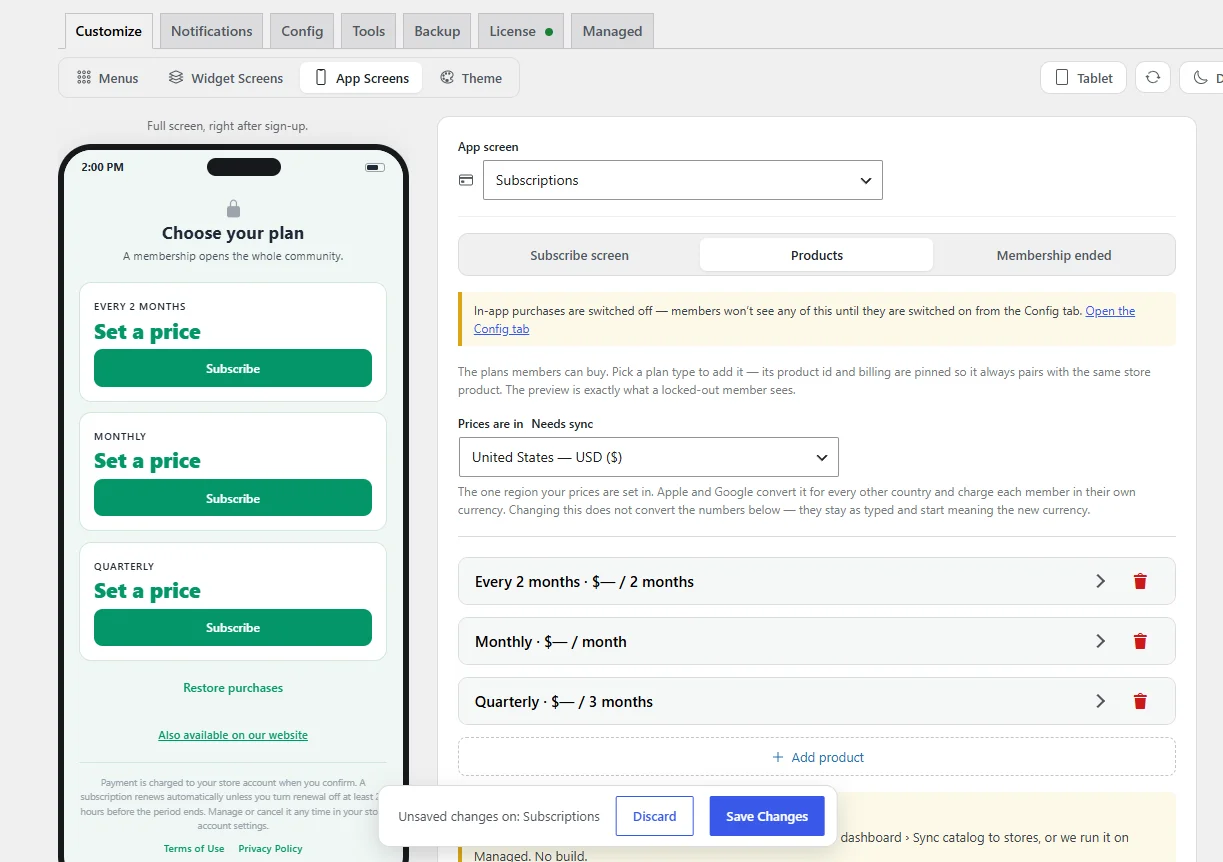
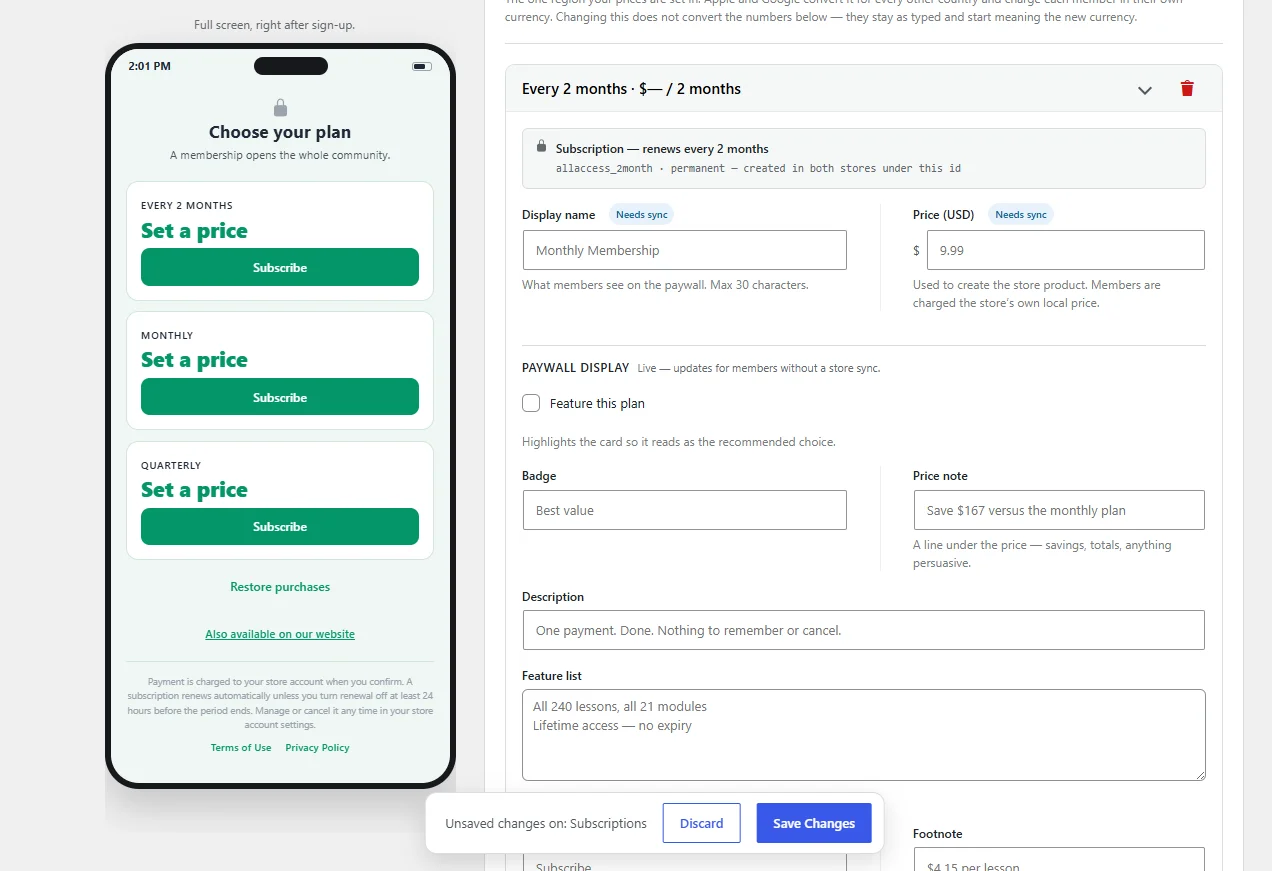
- Build your products and your paywall in Customize → Subscriptions: the heading and intro members read, the icons, the plan order, the wording when a membership lapses. It pushes out to App Store Connect and Play Console rather than you retyping everything into two consoles.
It's off until you turn it on, and an app that hasn't behaves exactly as it always did — no subscribe screen, no prices, no extra settings.
In the app
- Post something unlisted. A new visibility choice keeps a post out of the feed and out of everyone's notifications — it lives at its own address for the people you send it to. Relisting it later announces it properly. Anyone you @mention still hears either way.
- Menu buttons can carry your own pictures, in any zone, with a separate image for a tab's selected state. They answer a tap now too, and any row can be told to hold still.
- Screens fill in as they load — the shape of the post or card that's coming, instead of a spinner in an empty space.
- Sort the member directory in either direction, and it remembers.
- A member whose email needs confirming is told so, with a button to send a fresh one.
Fixed
- A scheduled post waits for the time you set. It was going out the moment you tapped Post — the composer closed and the post appeared, which reads as success until you notice the date.
- An unlisted post no longer announces itself, and relisting one now does.
- A widget that fails to load recovers on its own instead of staying blank until the app is reopened.
- Errors are explained rather than shown as a code, in English, Spanish or Greek.
- Sign-in no longer crashes against a stale saved copy of your settings.
In WP Admin
- Backup & Restore is its own tab, with Include secrets on by default — a backup without your credentials isn't one you can restore from. Private add-ons now declare their own tables, so a snapshot covers their data too.
- The Theme preview shows real screens. Hover a colour and the preview repaints everything it paints, so you can see at a glance where it goes; if the current screen doesn't use it, the phone switches to one that does. There are six presets now, each dressing the whole app rather than swapping one accent — including the new Emerald Canopy.
- The smart banner works for a hidden App Store listing. Apple's own banner only ever existed in Safari and silently collapsed whenever the App Store couldn't resolve the app — every load, for an unlisted employees-only listing. iPhones get the same prompt Android does now.
- The maintenance screen takes an icon or emoji, not just an image, and the Notifications tab folds into sections you can skim.
If you build your own app
- Test a store credential before a build depends on it — a Test button asks Apple and Google directly and reports the verdict, instead of a build failing hours later on a permission nobody checked.
- Turning on in-app purchases adds the native package at the version this release was tested against, and tracks which apps still need a build for it.
- A submit no longer hangs on a project with no git, build numbers only ever go up, and a rollback snapshot has a download button.
Plugin updates are available now — update TBC Community App and your add-ons as usual. The app-side changes ride along with the next app-store release, which we'll post about when it clears review.

The new Subscribe screen, built right in the Customizer.
Apple has been noticeably stricter this year with apps whose members subscribe on the website — so this release adds in-app purchases. For a lot of communities, setting up IAP is now what gets the app through review at all.
And it isn't all-or-nothing. Whether your whole community sits behind a membership, or you just want a few paid spaces or groups, it's the same setup — you decide what each product unlocks.