

TBC - Web - Automations

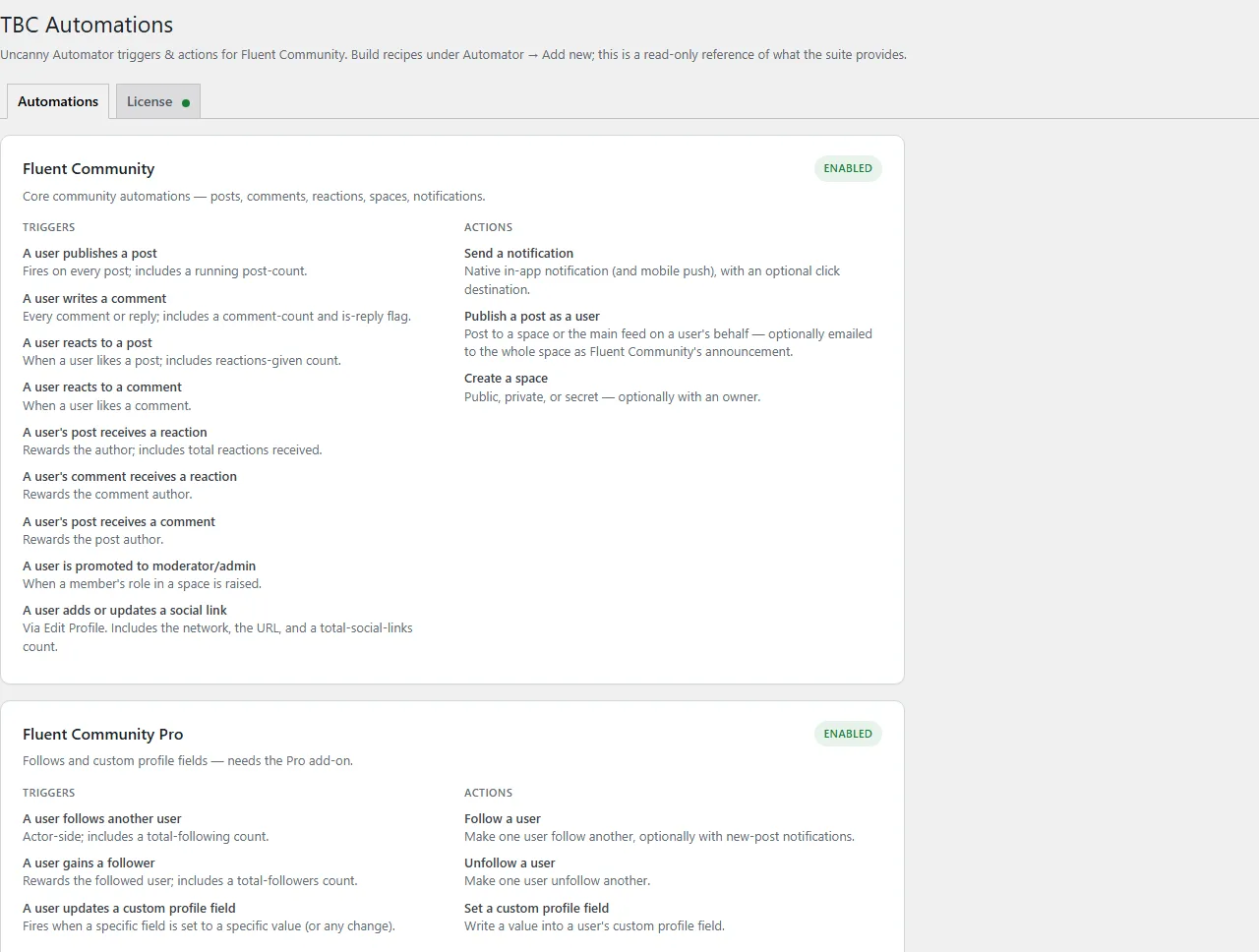
Eighteen Uncanny Automator triggers and actions for Fluent Community — DMs, notifications, follows, points, spaces, posts.

Price: $0.00
Buy Now

v1.1.10
Changelog · v1.1.10

1.1.10 — 2026-10-14

✨ New

  • Five new actions. Set a user's role in a space (adding them to it if needed, and firing Fluent Community's own join and role hooks); mark a user as verified, or not; invite someone to a space by email with Fluent Community's invitation email; and, with Fluent Community Pro, give a badge or remove one.
  • Seven new triggers. A user is created (any new account: sign-up, checkout, admin or import; Role filter), so a welcome recipe no longer needs Automator Pro for its first step; a user is mentioned in a post (once per member, when the post goes live; Space filter); a user votes in a poll (with the option chosen); a user's community profile is deactivated; and, with Fluent Community Pro, a user reaches a leaderboard level (any or a chosen one), a user's post or comment is reported (on its first report, and not again when the reported content is edited; the reason, and who reported it), and a user's post or comment is hidden for review after reports.
  • Start from a recipe. The Automations tab has four ready-made recipes (thank members for likes, a welcome DM on a first post, celebrate 10 likes, congratulate new moderators). Add as a draft imports one through Automator's own importer and opens it in the recipe editor to check and publish. The messages they send are in the site's language, and all four run on free Automator. "Welcome DM on a first post" and "Celebrate 10 likes" run once per member, so deleting a post or a like and redoing it doesn't send them again.
  • "The 10th like" works on free Automator. Every trigger that counts something (posts, comments, reactions given and received, follows, followers, group messages) has a When option: every time (the default), only when the total reaches a number, or every Nth time. Before, filtering on the count needed an Automator Pro condition.
  • Space filters. The post, comment, reaction, role and group-message triggers can be limited to one space, any space, or profile posts only. Writes a comment can also be limited to comments or replies.
  • User fields take an ID, email or username. Every recipient, sender, author, owner and follow field accepts a user ID, an email address, a login or a Fluent Community username, so an "Everyone" recipe (a form submission, say) can reach a member by the email token.
  • A post-link token on every post trigger. Every post, comment and reaction trigger, and Publish a post's output, hands the recipe the post's link, so a DM or email can say "see your post" with a working link.
  • Which reaction it was, with TBC Multi Reactions. When our TBC Multi Reactions plugin is active, the four reaction triggers offer Reaction and Reaction emoji tokens, so a recipe can say "Maya sent your post a ❤️". Without it the tokens aren't shown.
  • Pick spaces, courses and fields from a list. Publish a post's Space, Send a notification's space and course destinations, and Set a custom profile field's field are now dropdowns of what the site has, instead of a box for a raw ID. Each still takes a token or a typed ID or slug through "Use a token/custom value", and recipes saved before keep working.
  • Space filters on the comment-reaction triggers too: "A user reacts to a comment" and "A user's comment receives a reaction" can be limited to one space, any space, or profile posts.
  • A Default sender setting. Notifications and DMs with an empty Sender come from the user you pick on the TBC Automations page, or else the first administrator, and the Automator log says who sent them.
  • The page says when Uncanny Automator is missing, with an install button, and WordPress offers to install it when you activate this plugin.

🛠 Fixed

  • Text a member wrote no longer runs shortcodes. A "[shortcode]" typed into a message or post title that a recipe forwards is sent as text.
  • An empty Sender no longer means user ID 1, which many sites delete. A Sender that names nobody now fails with a clear message.
  • Create a space makes the same space the portal does: Fluent Community's default settings for the chosen privacy, plus new Description and Space group fields (the group can come from a token or a custom value, and one that is not a group fails the action).
  • Post totals count unlisted posts, which fire the trigger too.
  • Following, verifying, a badge or a profile field work for a member who has never opened the portal. "A user follows another user", "Mark a user as verified", "Give a badge" and "Set a custom profile field" failed with "No Fluent Community profile" when the member had an account but no community profile yet, as every new account has in a welcome recipe. They now create the profile first (for a follow, both members'), as Fluent Community does on that first visit, and never for an account the portal's access settings shut out.
  • Adding two social links in one save runs the recipe twice, once per network, and the trigger has a Network filter.
  • Received and given reaction totals leave out likes on your own posts, so a "reaches 10" total can't skip past 10.
  • A profile save Fluent Community refuses no longer runs the custom-field or social-link trigger. Both used to fire before the save went through, so a save rejected for a taken username or a too-long bio still ran the recipe. They now run once the profile is saved, from the values that were stored.
  • The readme, docs, store page and the plugin's own list now match what ships: 22 triggers and actions in two Automator groups, no "Email all members of a space" (gone since 1.1.8), and the custom-field trigger and action listed under Fluent Community, where they run (the fields themselves come from Fluent Community Pro). The readme has a changelog and is marked tested on WordPress 7.0.
  • Automator credits our triggers and actions to Two Birds Code. Each one's author and help link used to fall back to "Uncanny Automator" and Uncanny's knowledge base, so a question about one of ours went to Uncanny's support. The help link now opens this plugin's own docs, and Automator's Integrations page shows us as the developer.
  • Create a post's Space takes a slug as well as an ID, and a value that matches no space fails the action. Before, anything but a number posted to the main feed.
  • Folding cards point the reading way in right-to-left languages. With WordPress in a right-to-left language such as Arabic or Hebrew, a closed card's arrow on the settings page pointed right, away from the text. It now points left, and down when the card is open.
  • A link to a card in the plugin's guide opens it, even inside a closed section. A link straight to a card that sits inside one of the guide's folded sections opened the card but left its section shut, so the page showed nothing where the link pointed. Every fold around the card now opens.
  • A direct message to the sender themselves is skipped, not failed. When a Send a direct message action's sender and recipient are the same member, as when your default sender makes their own first post under the welcome DM recipe, nothing is sent and the action completes, with a note in the Automator log that it was skipped. Before, the log marked it as failed.
  • A "Post in a space" link with no space still opens the post. When a Send a notification action's Space was left empty or named no space, the notification had no link at all. It now opens the post the way "Any post" does.
  • Fewer database reads on every request. On a site without an object cache such as Redis, each TBC add-on read its licence key and its last licence answer from the database on every page and app request, two reads per add-on. From its next licence check (within a day of the update) WordPress loads both with its other settings, in the one read it already makes. Activating, checking and renewing a licence work as before. Every TBC add-on shares this licence code and WordPress runs the copy from the add-on that loads first, so keep your TBC add-ons current to get the whole saving.

🔧 Changed

  • Send a notification's "Community post (no space)" destination is now called "Any post". It always opened a post in a space as well as one outside any space, in the community portal and in the app, so the like recipes in the gallery use it for every post. Only the name changed: a recipe saved before may still show the old name until you open it and save it again, and it works the same either way.
  • Failed actions tell Automator what kind of failure it was. On Automator 7.3 and later each failure carries Automator's own error code (bad recipe input, something missing, or Fluent Community refused), instead of Automator guessing from the wording. The log message is the same.
  • Lighter on every page view. Automator now builds only the TBC triggers and actions that your published recipes use, and none at all on a site with no TBC recipe. Before, all 22 were built on every request.
  • The admin page has no inline styles left. The last two spacing rules moved into the page's stylesheet, so Plugin Check has nothing to flag. The page looks the same.

1.1.9 — 2026-10-03

🛠 Fixed

  • WordPress's "Check again" finds our updates. Dashboard › Updates › Check again now asks our licence server too, so an update we've just published shows at once instead of up to 12 hours later. Before, only the plugin's License tab Refresh did that.

1.1.8 — 2026-09-29

🛠 Fixed

  • The integrations list opens with Fluent Community switched off. It used to crash.

🔧 Changed

  • Emailing a space now uses Fluent Community's own announcement email. Publish a post has a new option, "Email this post to every member of the space", which sends in the background in batches and skips members who turned community emails off. The post's author must be an admin or moderator of that space, with announcement emails on in its settings; otherwise the automation stops and says why. The old "Email all members of a space" action is gone: on a big space it could hold up your site for minutes. An automation that used it stops sending until you switch it to Publish a post with the new option.

1.1.7 — 2026-09-23

🛠 Fixed

  • Send a direct message goes through Fluent Messaging's own send, so a blocked conversation is refused and the message renders as one typed in the app.
  • Set a profile field cleans the value with Fluent Community Pro's own rules for the fields it defines.
  • Create a space sets it up the way Fluent Community does — its creation hooks run, and a private space's posts reach its owner's feed at once.
  • Email all members of a space sends through Fluent Community's mailer and template, and shows in its email log.

🔧 Changed

  • "Delete all plugin data" removes the license key too. With that switch on, uninstalling removes everything the plugin stored — the license key, its licenser records and cached checks included — so a reinstall asks for the key again. With it off, nothing is deleted, as before. Every TBC plugin now does the same; before, some kept the key and some did not.

📡 OTA & Internal

  • One custom-field lookup and one push-type constant, and comments that match the code.
  • The shared licenser drops hooks and an argument nothing used, and its comments say what it does rather than how it got there.

1.1.6 — 2026-09-08

🔧 Changed

  • The admin explains itself on request, not on sight. The paragraphs printed beside each control — read once, taking room forever — are behind a ? now, the same one on every screen in the suite. Orientation goes behind it; warnings, legal text and anything describing what is currently set stay visible, because a message you have to click to discover is not a warning.

✨ New

  • Recipe notifications are now this plugin's own push type. The mobile app's Notifications screen has always carried a row for the notifications your recipes send — but it was shipped by the Community App plugin, labelled "Automated notifications", and badged as core, so it appeared on every site whether or not it could ever fire. It now comes from here: it is called Automation notifications, it carries this plugin's badge, and it exists only where the recipes that use it do. Your existing settings and every member's opt-out carry over untouched.
  • Recipe notifications translate. The plugin now ships Spanish, Greek and Dutch for the strings a member actually reads — the notification's name and description in the app's settings, and the "New Notification" title a recipe falls back to when you leave the title field empty. Each one renders in the member's own app language. The admin screens and the recipe builder stay English.

🛠 Fixed

  • A push now opens what the recipe pointed it at. Tapping the notification on your phone always landed on the notifications list, whatever the recipe's Click destination said — the post, space, course, lesson or profile you chose only worked from inside the app's bell. Both now go to the same place, and notifications already sent behave the same way.
  • "Course home" and "Course lesson" work from a Course ID token. Fluent Community keeps courses and spaces in one place but hands out spaces only, so a recipe passing a Course ID got nothing back and the notification quietly pointed at the recipient's own profile instead. Typing the course slug by hand had always worked; the token now does too.
  • A course opens the course, not the space behind it. The app has a course screen of its own, and a notification aimed at a course was opening it as a plain space.

1.1.5 — 2026-09-03

🛠 Fixed

  • A "create post" action the site refuses fails that one action, not the whole run. Fluent Community throws, rather than answering, when a post is empty, over the site's length limit or missing a title the community requires — and an automation whose post hit one of those stopped dead mid-run, taking every later action with it. The refusal is caught now and recorded against the action; the rest of the run carries on.

1.1.4 — 2026-08-26

🔧 Changed

  • The shared admin library caught up with the rest of the suite. Every TBC plugin ships a byte-identical copy of the same admin CSS, JS and licenser under one handle, and this plugin's copy had fallen behind. It now carries the Hide sensitive control — which covers credentials on screen so a settings page can be screen-shared or screenshotted without publishing them — the one-open-at-a-time accordion, and newest-wins registration, so the copy WordPress actually loads is the most recent one installed rather than whichever plugin happened to register first.
  • The documentation theme re-synced, so this plugin's HTML reference looks like the rest of the suite again.

1.1.3 — 2026-08-01

🔧 Changed

  • The License tab's support contact follows the site's vendor identity. A dev-bundle buyer running managed service for their own clients points it at their own business from the client site's wp-config.php, so their clients see their address rather than ours. Left undefined it stays Two Birds Code, so nothing changes on an ordinary install.

1.1.2 — 2026-07-29

🛠 Fixed

  • A notification sent by a recipe could blank the whole notification list. Fluent Community's portal reads a route on every notification outside its own comment and mention types, so a row saved without one throws — and because the list renders as a single loop, one bad row takes out every notification for every member. The unread badge and pagination keep reporting correct totals, so it reads as "notifications stopped being recorded" against a database that's completely intact, and deactivating the plugin doesn't help because the row is already written. Recipes that left the notification's link empty were saving exactly that. They now fall back to a sensible route.
  • Licensing resilience. A rate limit or brief license-server hiccup no longer disables a licensed site — the plugin runs on its last good check, and only a definitive invalid or expired answer gates features. A revoked key also can't slip back to licensed between checks.

1.1.0 — 2026-07-09

✨ New

  • A "Delete data on uninstall" switch on the License tab. Automations has no separate settings tab, so the standard Data Management toggle lives on the License panel. Off by default: uninstalling leaves your stored settings alone unless you turn it on. Nothing about your recipes or activation is touched.

🔧 Changed

  • Uninstalling no longer throws away your license key, and only clears data when you ask. Previously removal always deleted the key and caches. Now uninstall does nothing unless you opt in with the toggle above — and even then the key is deliberately kept, so a rebuild, migration or reinstall won't force re-activation. Opting in removes only the plugin's own caches, warning flags, legacy migration markers and the toggle setting.
  • The Automations admin screen follows the shared TBC palette, rewired from baked-in light-only colors to the shared design tokens, so it renders consistently with the rest of your TBC admin including dark admin schemes. No settings or behavior change.

📡 Internal

  • Resynced the bundled licenser to the canonical version, keeping every plugin's copy byte-identical under the release drift gate. It picks up a license-nag suppression option other plugins use for pre-purchase pages; Automations doesn't use it, so runtime behavior is unchanged.

Automations · WordPress plugin · Uncanny Automator

The Fluent Community blocks Automator is missing.

“When a member gets their tenth reaction, award a badge.” “When someone joins, send a welcome DM.” Eighteen triggers and actions built on Fluent Community’s own models and hooks — so the results are identical to doing it by hand. No code, no glue plugins.

18triggers and actions, under one integration in Automator
0polling — real Fluent Community hooks, never a timer
1integration to find them all: “TBC Automations”
↻they chain — a published post can fire your reaction and comment rewards

Three groups · eighteen blocks

Messaging, gamification, and the rest.

Click a tab. The capture opens full size.

Automations › What is inside
Choose a view

Reach a member directly

DMs, notifications and follows

  • Send a direct message through FluentChat
  • Send an in-app notification — with mobile push and an optional tap-to-open destination: a space, post, profile, course or lesson
  • Triggers on messages — a user sends one, or receives one
  • Follow and unfollow a user as an action
  • A user gains a follower — with a running follower-count token, so “reach 100 followers” is one recipe
The Automations settings screen in WordPress
One settings page; the recipes live in Automator.

Built for GamiPress and points engines

Reward what people actually do

Several of these carry a running total as a token, which is what turns a trigger into a milestone.

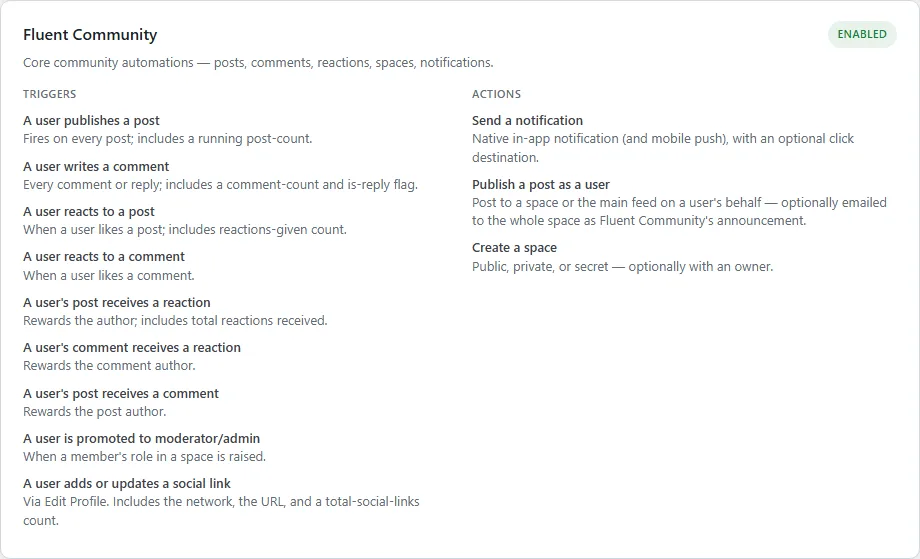
  • A user’s post receives a reaction — with a total-reactions token, so “get 10 reactions → badge” works
  • A user’s comment receives a reaction
  • A user’s post receives a comment
  • A user publishes their first post, or writes their first comment
  • A user is promoted to moderator or admin
the Fluent Community card, its triggers beside its actions
Fluent Community — triggers on the left, actions on the right.

Profiles, spaces and content

Act on the community itself

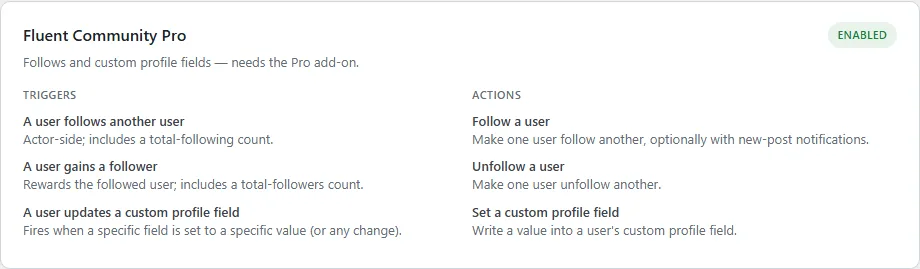
  • A user updates a custom profile field to a specific value — as a trigger
  • Set a user’s custom profile field — as an action
  • Create a space, public, private or secret
  • Publish a post as a user, to a space or the main feed
  • Email all members of a space
the Fluent Community Pro card, its course triggers and actions
Fluent Community Pro — courses, lessons and enrolments.

Smart by design

  • Loads only what you have — each automation activates when its dependency is present, so nothing errors on a feature you have not installed
  • No loops, no hacks — real Fluent Community hooks rather than polling
  • Where Fluent Community has no hook for something, such as follow requests, it is left out rather than faked
  • Auto-updating — activate your key and updates arrive through your dashboard

What you need

  • Uncanny Automator (free or Pro)
  • Fluent Community — Pro for follows, the gains-a-follower trigger and custom-profile-field automations
  • FluentChat for the direct-message action and the send/receive triggers

Pricing

Free.

Automations is one of our free tools. Activate a licence key so updates arrive automatically, and build whatever recipes you like.

AutomationsWordPress plugin · Uncanny Automator integrationFree
At checkout$0

0 Reviews

Loading reviews...

No reviews yet. Be the first to write a review!

Related Products

TBC - Web - Admin Columns

TBC - Web - Admin Columns

Fluent Community fields, stats, roles and user-meta as sortable, inline-editable columns on the Users list and WooCommerce Orders.

Price: $0.00

TBC - Web - User Switching

TBC - Web - User Switching

Puts the free User Switching plugin's buttons in the Fluent Community portal: Switch user on a member's profile, and Switch back in the header to return to your own account.

Price: $0.00
TBC -App - Better Messages Addon

TBC -App - Better Messages Addon

Hand the app’s messaging to Better Messages — threads, group chats, attachments, reactions, rooms — with push that deep-links to the conversation.

Price: $0.00
TBC App - Community App (Dev Bundle)

TBC App - Community App (Dev Bundle)

The full React Native source plus the build dashboard. Configure your site, drop in your assets, and ship to both stores yourself — no coding required.

From $50.00
TBC App - Community App (Managed)

TBC App - Community App (Managed)

Your own branded community app on iOS and Android — built, published and kept up to date by us, under your accounts. You bring the content and branding; we handle every build and update.

From $33.00
TBC App - Youtube Widget

TBC App - Youtube Widget

Your latest uploads on the home screen, tapping through to playlists and videos — cached server-side so it never burns API quota.

Price: $29.00