


TBC - Web - User Switching

Puts the free User Switching plugin's buttons in the Fluent Community portal: Switch user on a member's profile, and Switch back in the header to return to your own account.

Price: $0.00
Buy Now

v1.0.2
Changelog · v1.0.2

1.0.2 — 2026-10-14

🛠 Fixed

  • Folding cards point the reading way in right-to-left languages. With WordPress in a right-to-left language such as Arabic or Hebrew, a closed card's arrow on the settings page pointed right, away from the text. It now points left, and down when the card is open.
  • A link to a card in the plugin's guide opens it, even inside a closed section. A link straight to a card that sits inside one of the guide's folded sections opened the card but left its section shut, so the page showed nothing where the link pointed. Every fold around the card now opens.
  • Fewer database reads on every request. On a site without an object cache such as Redis, each TBC add-on read its licence key and its last licence answer from the database on every page and app request, two reads per add-on. From its next licence check (within a day of the update) WordPress loads both with its other settings, in the one read it already makes. Activating, checking and renewing a licence work as before. Every TBC add-on shares this licence code and WordPress runs the copy from the add-on that loads first, so keep your TBC add-ons current to get the whole saving.

1.0.1 — 2026-10-07

✨ New

  • Part of the TBC suite. The plugin now has its own admin page under TBC Community App (or a top-level TBC User Switching menu without it). The Overview tab shows whether User Switching and Fluent Community are active, with an install or activate button when User Switching is missing, and explains who can switch and where the buttons show.
  • A free license with updates. Activate the key from the free checkout on the License tab. The key turns the buttons on and brings updates and the changelog into Dashboard › Updates. The License tab also holds the standard "Delete all plugin data when uninstalled" switch.
  • Documentation. A reference page ships inside the plugin, in docs/tbc-user-switching-fc.html.

🛠 Fixed

  • Switch back works on sites installed in a subfolder. The header pill built its return address from the site address plus the page path, so on a site at example.com/community the folder appeared twice and switching back landed on a page that doesn't exist. It now uses the page address exactly as User Switching does.
  • One "Switch back" button, not two. On portal pages without the toolbar, User Switching printed its own floating "Switch back" link in the corner next to our header pill. It is hidden while the pill shows.

🔧 Changed

  • Uses User Switching's and Fluent Community's own helpers. The pill's hover text is User Switching's own "Switch back to …" message, in your language, and profile links come from Fluent Community, so both stay in step with those plugins.
  • Stays out of the app. The TBC Community App's screens and its in-app browser show no switch buttons. Switching accounts is a job for the website.

1.0.0 — 2026-07-13

Initial release — Fluent Community front-end bridge for the free User Switching plugin. All security (capability checks, nonces, cookie/session handling, the switch-back stack) stays in User Switching; this plugin only places the buttons in the FC portal.

✨ New

  • "Switch user" on profiles. Admins (anyone User Switching allows to switch to that member: someone who can edit them, or a role granted the switch_users capability) get a switch action button on every other member's Fluent Community profile, rendered through FC's native profile_nav_actions slot — no SPA hacking, update-safe. After switching you land back on that member's profile, now as them. Regular members never see the button.
  • "Switch back" pill in the portal header. While impersonating, a labelled pill sits in the portal header on every page (hover shows who you'll switch back to) — deliberately loud, and it covers the FC portal hiding the admin bar where User Switching's own link lives. Follows FC light/dark mode via --fcom-* variables; collapses to icon-only on phones.
  • Switch-back on profiles too. While switched, profile pages show the switch-back action in the same nav-actions slot.
  • Dependency guard. Requires Plugins: user-switching header (WP 6.5+ native enforcement) plus an admin notice with a one-click Install / Activate button when User Switching is missing or inactive.

User Switching for Fluent Community · WordPress plugin · web portal

See the community the way a member sees it.

The free User Switching plugin signs you in as another member and back again with one click, but its buttons live in WP Admin and the toolbar, which the Fluent Community portal usually hides. This add-on puts them in the portal: Switch user on a member’s profile, and Switch back in the header while you are signed in as them.

1 clickto sign in as a member, from their profile
1 clickback to your own account, from any portal page
0settings. User Switching decides who can switch
Webonly. The TBC Community App shows no switch buttons

Two buttons · one add-on

Switch to a member, look around, switch back.

Click a tab.

User Switching › How it works
Choose a view

On a member’s profile

Switch user, beside the profile tabs

Open a member’s profile in the portal and the button is there. Click it and you land on the same profile, signed in as them, so you see the portal exactly as they do.

  • Shows only on the profiles of members you are allowed to switch to
  • Never on your own profile
  • Sits where Fluent Community puts profile buttons, in the portal’s light or dark colours
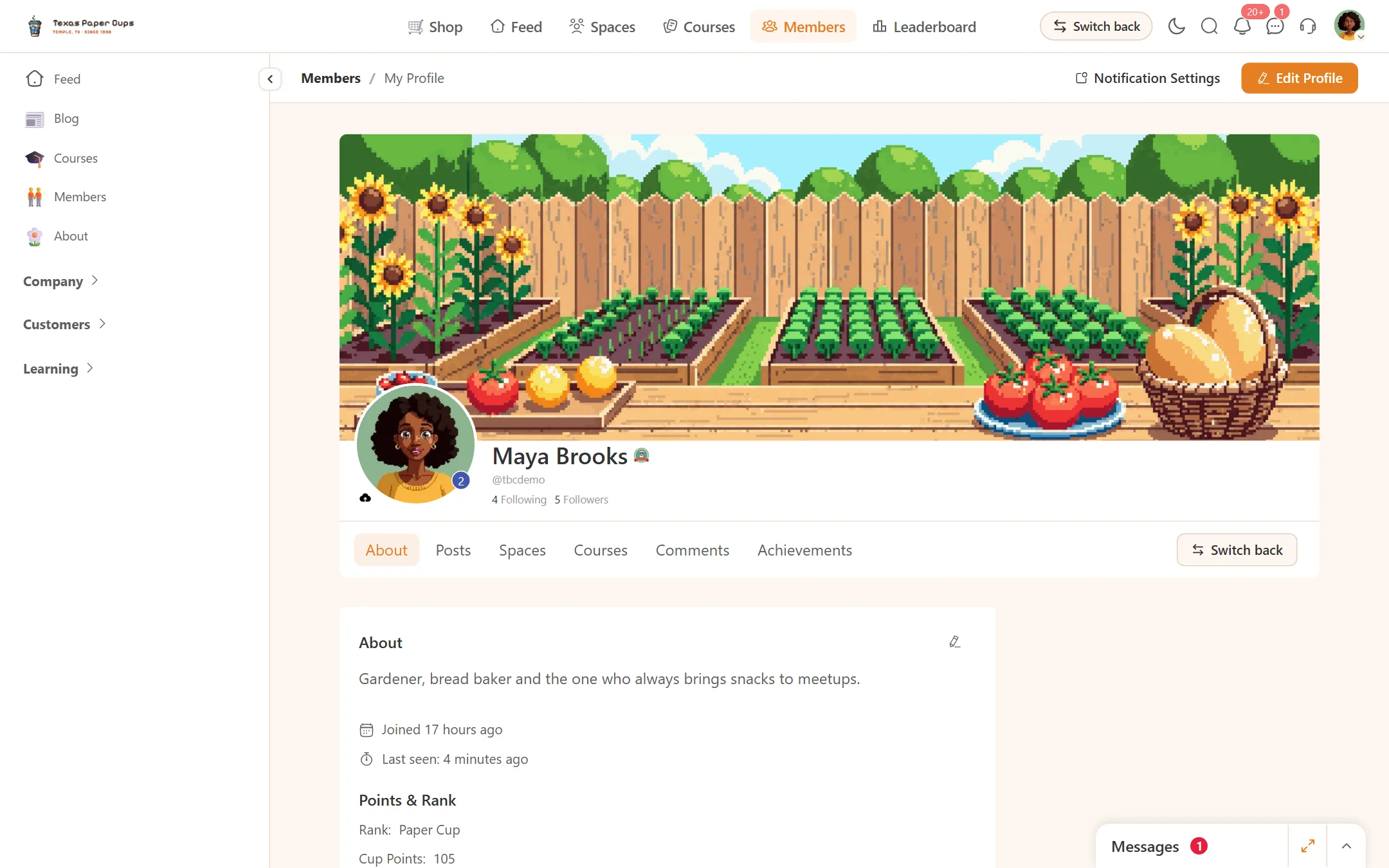
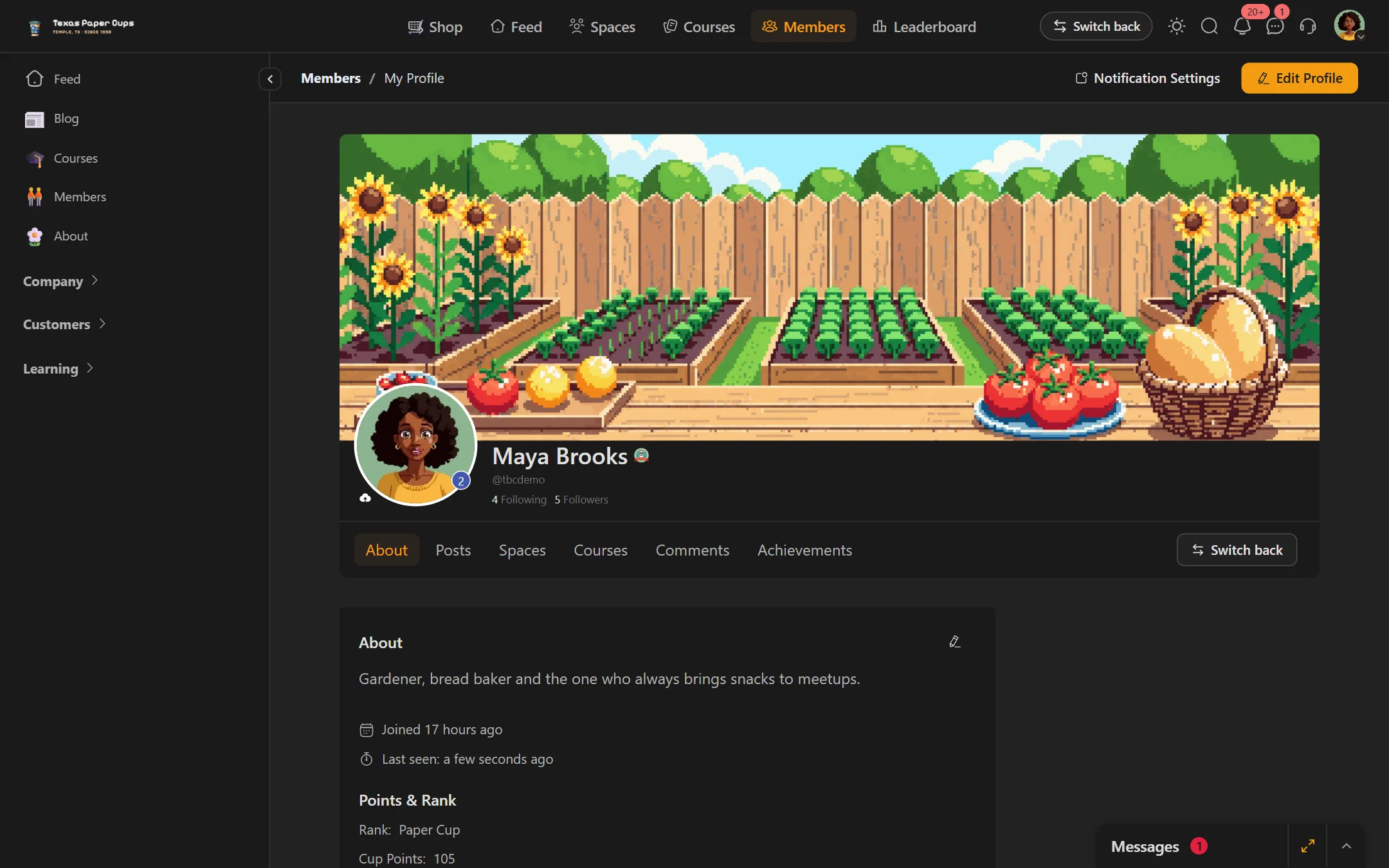
A member profile in the portal with a Switch user button beside the profile tabsA member profile in the portal with a Switch user button beside the profile tabs
Switch user sits with the profile buttons.

While you are someone else

A Switch back pill on every page

While you are switched, a Switch back pill sits in the portal header on every page, and every profile shows Switch back too. Either one returns you to your own account on the page you were on.

  • Hover the pill to see whose account you go back to
  • On a phone the pill shrinks to an icon
  • User Switching’s own floating switch-back link is hidden while the pill shows, so there is one button, not two
The portal header with a Switch back pill while signed in as a memberThe portal header with a Switch back pill while signed in as a member
One click takes you back to your own account.

User Switching makes every decision

The same rules as in WP Admin

Someone can switch to a member when WordPress lets them edit that member, which on a standard site means administrators. A role editor plugin can grant or deny switching for a role. The security checks, the sign-in cookies and the record of who you really are all stay in User Switching.

  • No settings to configure
  • Members without the right never see a button
  • No switch buttons in the TBC Community App, on its own screens or in its in-app browser
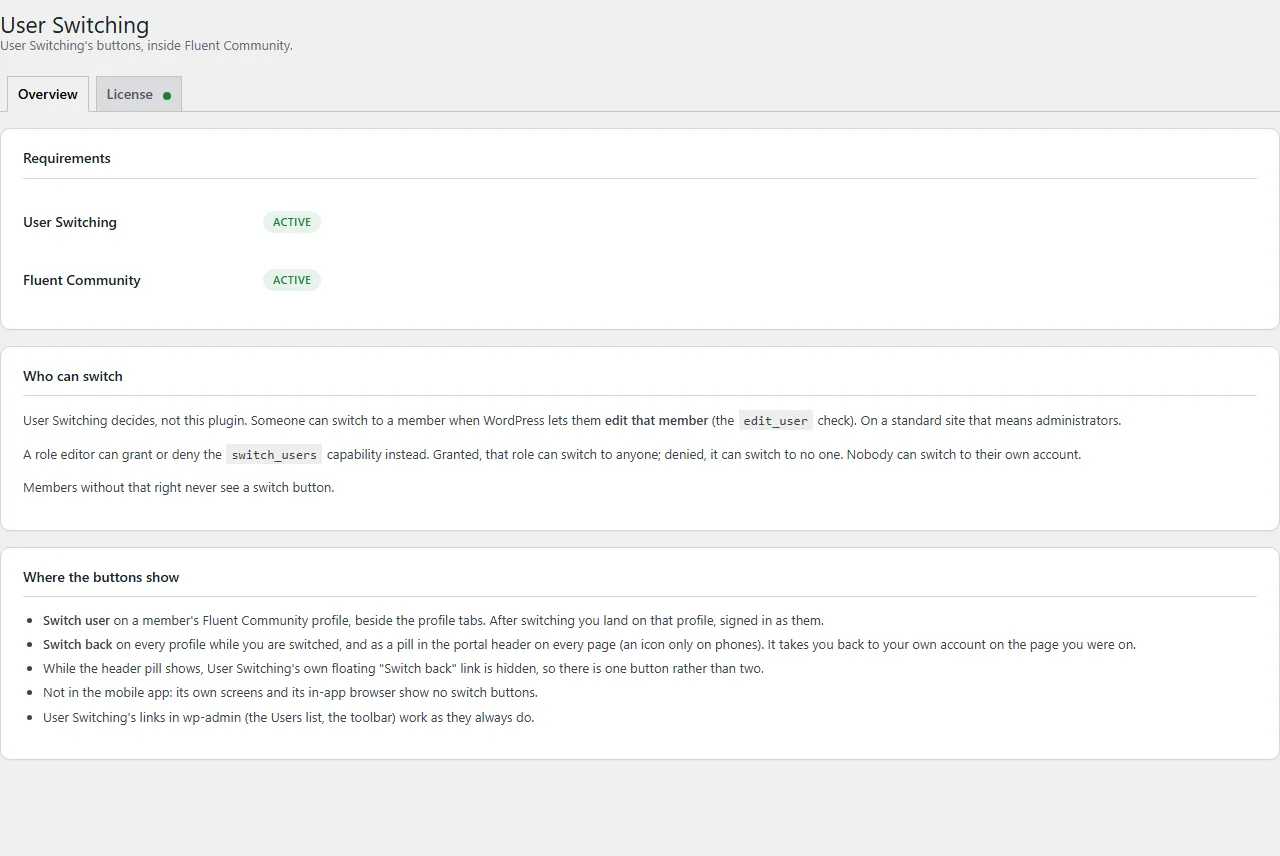
The User Switching overview page in WordPress admin
The overview shows whether User Switching is ready and who can switch.

What you get

  • A Switch user button on member profiles in the portal
  • A Switch back pill in the portal header while you are switched
  • A WP Admin page that shows whether User Switching is active, with a one-click install
  • A free licence key that turns the buttons on and brings updates

What you need

  • Fluent Community, free or Pro
  • User Switching, free from WordPress.org
  • The TBC Community App is not required. This is a website tool

Pricing

Free.

User Switching for Fluent Community is one of our free tools. Take the free licence key at checkout and activate it on the plugin’s License tab: the buttons show once it is active, and updates arrive with it.

User Switching for Fluent CommunityWordPress plugin · web portalFree
At checkout$0

0 Reviews

Loading reviews...

No reviews yet. Be the first to write a review!

Related Products

TBC - Web - Admin Columns

TBC - Web - Admin Columns

Fluent Community fields, stats, roles and user-meta as sortable, inline-editable columns on the Users list and WooCommerce Orders.

Price: $0.00

TBC - Web - Automations

TBC - Web - Automations

Eighteen Uncanny Automator triggers and actions for Fluent Community — DMs, notifications, follows, points, spaces, posts.

Price: $0.00
TBC -App - Better Messages Addon

TBC -App - Better Messages Addon

Hand the app’s messaging to Better Messages — threads, group chats, attachments, reactions, rooms — with push that deep-links to the conversation.

Price: $0.00
TBC App - Community App (Dev Bundle)

TBC App - Community App (Dev Bundle)

The full React Native source plus the build dashboard. Configure your site, drop in your assets, and ship to both stores yourself — no coding required.

From $50.00
TBC App - Community App (Managed)

TBC App - Community App (Managed)

Your own branded community app on iOS and Android — built, published and kept up to date by us, under your accounts. You bring the content and branding; we handle every build and update.

From $33.00
TBC App - Youtube Widget

TBC App - Youtube Widget

Your latest uploads on the home screen, tapping through to playlists and videos — cached server-side so it never burns API quota.

Price: $29.00